
Pepe Launcher · PEPELAUNCHER
The Astronaut Pepe TradingView hid in NASDAQ:SPACEX — now a memecoin on Ethereum.
What is this?
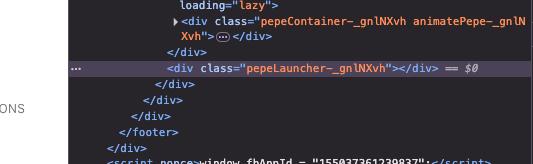
PEPELAUNCHER is a memecoin on Ethereum built around a real easter egg: scroll TradingView's NASDAQ:SPACEX page to the footer, wait a few seconds, and an Astronaut Pepe launches — its element is literally class="pepeLauncher". Read the full story →
PEPELAUNCHER
The origin · NASDAQ:SPACEX
TradingView shipped an animated Astronaut Pepe to production on their SpaceX IPO symbol page. We didn't make that up — we made it a token. See it on TradingView.
About Pepe Launcher
Pepe Launcher (PEPELAUNCHER) is a community memecoin on Ethereum. It exists for one reason: TradingView hid an Astronaut Pepe on their NASDAQ:SPACEX page and named the element pepeLauncher. The chart is live, the contract is on-chain, and the easter egg is real and still on their site today.
This page is styled as a tribute to the TradingView symbol page where the egg lives. PEPELAUNCHER is an independent memecoin and is not affiliated with, endorsed by, or connected to TradingView or SpaceX in any way.
The Easter Egg
This isn't a fan theory. It's in their source code.
Every word of this is verifiable in about thirty seconds on tradingview.com/symbols/NASDAQ-SPACEX.
- 01
Open NASDAQ:SPACEX on TradingView
TradingView added a symbol page for SpaceX ahead of its IPO. Top of the page looks completely normal.
- 02
Scroll to the footer and wait
Their slogan sits there, set huge: “Look first. Then leap.” Idle on it for five to ten seconds.
- 03
An Astronaut Pepe launches across it
A green frog in a spacesuit drifts over the slogan — a real easter egg, shipped to production on a finance platform.
- 04
Inspect it: class="pepeLauncher"
Open DevTools and the node reads class="pepeLauncher", nested in pepeContainer animatePepe. TradingView named it.
Real-time
PEPELAUNCHER / WETH
Ethereum · Uniswap · live from DexScreener
Price
—
Change 24h
—
Market cap
—
Liquidity
—
Volume 24h
—
Loading live chart…
Taking too long? Open on DexScreenerHow to buy
Four steps to the launch pad.
Get a wallet
Install MetaMask or Rabby on desktop, or any Ethereum wallet on mobile. Fund it with ETH for the swap and gas.
Copy the contract
Use only the address below. Confirm it matches the X account and Etherscan before you swap.
Swap on Uniswap
Open Uniswap, paste the contract as the output token, set slippage if needed, confirm.
Look first. Then leap.
You now hold the easter egg TradingView shipped to production.
Official contract
Tokenomics